Google Workspace Migration Services

Secure, Planned Google Workspace Migrations for Your Business

Moving business email and company data from one cloud platform to another requires more than simply transferring files.

TCI Technologies provides Google Workspace migration services for businesses throughout Long Island, New York City and the Tri-State area.

Whether you’re moving to Google Workspace, migrating from Google Workspace to Microsoft 365, or replacing an older email platform, TCI can plan and manage the migration while minimizing downtime and disruption for your employees.
Talk to TCI About Your Migration →

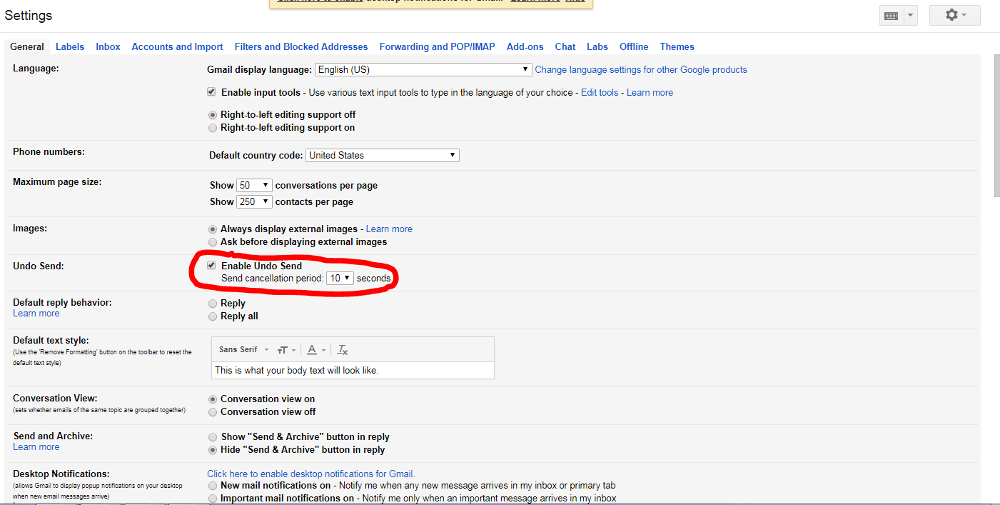
How can you unsend an email in gmail

Google Workspace Migration Services

TCI can assist with migrations involving:

✓Microsoft 365 to Google Workspace
✓Google Workspace to Microsoft 365
✓Legacy email systems to Google Workspace
✓Gmail and business email migrations
✓Google Drive and Shared Drive migrations
✓OneDrive and SharePoint migrations
✓Calendar and contact migrations
✓Domain and DNS configuration
✓User account setup and licensing
✓Email security configuration

We evaluate the existing environment before migration, so users, data, permissions, email flow and security requirements are all part of the plan.

Microsoft 365 ↔ Google Workspace Migrations

Migrations run in both directions. Here’s what typically moves:

What Moves in Each Direction
What moves Microsoft 365 → Google Workspace Google Workspace → Microsoft 365
Email Exchange Online → Gmail Gmail → Exchange Online
Calendars Outlook calendars → Google Calendar Google Calendar → Outlook
Contacts Outlook contacts → Google Contacts Google Contacts → Outlook
Personal files OneDrive → Google Drive Google Drive → OneDrive
Shared files SharePoint → Shared Drives Shared Drives → SharePoint
Groups Distribution lists and groups → Google Groups Google Groups → Microsoft 365 groups
Accounts, domains and DNS ✓ Included ✓ Included
Security configuration Google Workspace security settings Microsoft 365 security, Entra ID and Intune

Exactly what can be transferred depends on the source, destination, data type and environment, and is confirmed during assessment.

Microsoft 365 → Google Workspace

We migrate and reconfigure Exchange Online email, Outlook calendars, contacts, OneDrive and SharePoint data, groups, user accounts, domains and email security, then help users transition to Gmail, Google Calendar, Google Drive, Shared Drives, Google Meet and other Google Workspace services.

Google Workspace consulting & support →

Google Workspace → Microsoft 365

If Microsoft 365 is a better fit, we move your Google Workspace environment to Microsoft’s cloud and configure Exchange Online, SharePoint, OneDrive, Teams, Entra ID and Intune as part of the new environment.

See our nonprofit migration case study →

Business Email Migration

Not every migration requires changing your entire productivity platform.

TCI can migrate email from legacy or hosted email environments to Google Workspace / Gmail or Microsoft 365 / Exchange Online. Planning can include mailboxes, aliases, calendars, contacts, distribution groups, shared access, domains and mail routing.

Our Google Workspace Migration Process

1. Assessment

We review users, mailboxes, domains, storage, shared data, permissions, applications and security requirements.

2. Migration Planning

We determine what needs to move, identify potential issues and develop an approach designed to minimize disruption.

3. Account & Security Configuration

We prepare user accounts, permissions, groups, security settings and authentication requirements in the new environment.

4. Data Migration

Email, calendars, contacts, files and other supported data are migrated according to the agreed project scope.

5. Domain & Email Cutover

We coordinate DNS and email configuration, including MX, SPF, DKIM and DMARC records, as applicable.

6. Verification & Support

We verify key services and help users with access, email, file or configuration issues related to the transition.

Moving Google Drive & Company Data

Email is often only one part of a migration. TCI can plan the movement of data between Google Drive, Google Shared Drives, Microsoft OneDrive, Microsoft SharePoint, file servers and other supported cloud storage platforms.

Plan before you move: permissions, ownership, shared data, external sharing, file structures and user access all deserve attention before company information moves. Learn about our SharePoint migration approach.

Migration Without Unnecessary Disruption

A successful migration should be planned around the business, not just the technology. TCI considers:

✓Employee access
✓Email continuity
✓Shared mail and groups
✓Company files
✓Permissions
✓Mobile devices
✓Security
✓DNS and domain configuration
✓Business applications that depend on email
✓User communication and transition support

Our objective is to make the change as straightforward as possible for employees while protecting access to important business information.

Google Workspace or Microsoft 365?

TCI supports both, and we don’t believe every organization should automatically be moved from one platform to another.

We look at how your employees work, your existing applications, security requirements, collaboration needs, licensing and future technology strategy. If Google Workspace is the right fit, we’ll help you deploy and manage it. If Microsoft 365 is the better fit, we’ll help you migrate properly.

Compare Google Workspace and Microsoft 365 · Microsoft 365 Buyer’s Guide

Why Choose TCI for Your Migration?

TCI provides more than migration services. Your migration is approached as part of your overall IT and cybersecurity environment, not as an isolated email project.

Planning a Google Workspace Migration?

Whether you’re migrating to Google Workspace, from Google Workspace to Microsoft 365, or away from a legacy email platform, TCI Technologies can help plan and manage the transition.

Talk to TCI About Your Google Workspace Migration →

Or call (516) 484-5151 · Serving Long Island, NYC and the Tri-State area